With dozens of AI models launching each week, choosing the right tool is harder than ever. Here's a practical decision framework for Hong Kong creators.
What happens when your team has 12 AI image models, 8 video tools, and 5 voice platforms to choose from — and a client deadline in 48 hours? Analysis paralysis. The AI model landscape in late 2026 is wider and more specialised than ever. Choosing wrong means wasted credits, wrong output formats, or a reshoot.
This guide gives Hong Kong creators a practical decision framework: classify your project, match it to model capabilities, and build a repeatable selection workflow.
Step 1: Classify Your Project by Output Type
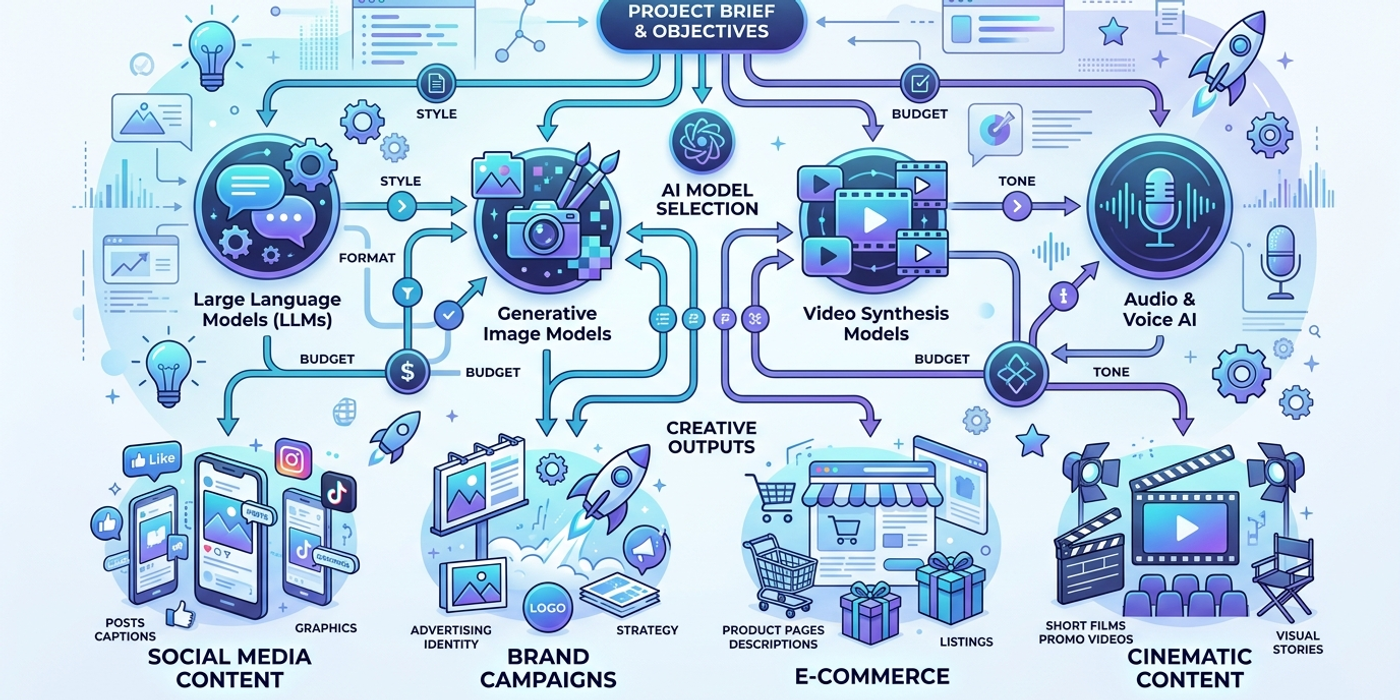
Every creative project at a Hong Kong agency falls into one of four output categories.
Social media content (short-form, high volume). Think Instagram Reels, TikTok videos, or WhatsApp broadcast images. The priority is speed and iteration. Models with built-in template systems — like ChatGPT Images 2.5's sketch-and-render workflow or Nano Banana 2's style presets — cut per-asset production time by 70%.
Brand campaigns (high-fidelity, controlled). When a client like HSBC or Lee Kum Kee approves a campaign, output needs to be pixel-perfect and reproducible. Use models with strong compositional control (FLUX 3.0 tools, ComfyUI workflows) and image-to-image pipelines that lock reference styles. Video campaigns benefit from Veo 3.1's keyframe control or LTX-2.5's multi-shot consistency.
E-commerce and product photography (consistent, volume). Hong Kong e-commerce brands need 50-200 product shots per catalogue with consistent lighting and backgrounds. Use a batch-oriented model like Ideogram 4.0 or FLUX Schnell with a reference image and fixed prompt template. For video showcases, Kling 3.0's product-to-video workflow generates clips from a single product image.
Narrative or cinematic content (story-driven). Short films and brand documentaries need scene-to-scene consistency across multiple shots. Seedance 2.5 and Gemini Omni Flash maintain character and setting continuity across generations. The trade-off is speed: cinematic models take 3-5x longer per generation.
Step 2: Map Model Capabilities to Your Workflow Stage
The same model can be the best choice for one stage of production and a bottleneck in another.
Drafting and ideation. This stage is about volume, not perfection. Use the fastest models available: Flux Schnell (1-2 seconds per image), Kling 3.0 Turbo (5 seconds per video clip), or Gradium TTS Fast mode for voice drafts. Generate 20-30 options in under 5 minutes for client mood boards.
Production and refinement. Once the creative direction is approved, switch to quality models. For images, GPT-Image-2 or Seedream 4 deliver the best prompt adherence and detail. For video, Veo 3.1 or LTX-2.5 with multi-shot support produce 4K-ready results. Invest 80% of your generation budget on 20% of the outputs.
Final delivery and format adaptation. The last mile requires models that understand output specifications. AI video parameters — resolution, frame rate, duration, aspect ratio — must match platform requirements. Newer models like FLUX 3 Video and Seedance 2.5 let you specify these directly in the prompt.
Step 3: Build a Reusable Model Selection Matrix
Create a simple matrix that maps common project types to your go-to models.
| Project Type | Draft Model | Production Model | Budget Range (credits) | |---|---|---|---| | Social media image | Flux Schnell | Nano Banana 2 / ChatGPT Images 2.5 | 10-30 per asset | | Social video | Kling 3.0 Turbo | Veo 3.1 / Seedance 2.5 | 50-200 per clip | | Product catalogue | FLUX 3.0 Tools | Ideogram 4.0 | 5-15 per image | | Brand campaign video | Kling 3.0 | LTX-2.5 / Gemini Omni Flash | 200-800 per video | | Voiceover / narration | Gradium TTS | Cartesia Sonic 3.6 | 1-5 per minute | | Music / background track | Suno Studio 2.0 | MiniMax-Music3 | 5-20 per track |
Review the matrix every 2-3 weeks — a model that was best in class a month ago may now be third-best.
Step 4: Optimise Cost vs. Quality Per Project
Hong Kong agency margins mean every credit counts.
Rule of thumb: allocate 10% of your generation budget to drafting, 70% to production, and 20% to final delivery and revisions.
When to use cheap models. Internal mood boards, client pitch decks, low-fidelity storyboards. Never spend premium credits on throwaway work.
When to use premium models. Final deliverables, campaign assets going to print or broadcast, and any output where the brand's name is visible. The extra cost (2-5x per generation) pays for itself in fewer rejection rounds.
When to split the workflow. Generate the clip with a mid-range model (Kling 3.0, Veo Lite) and upscale with a premium tool (LTX-2.5, Gemini Omni Flash). This cuts costs by 40-60% while delivering broadcast-ready quality.
Frequently Asked Questions
Q: How do I decide between an open-weight model and a hosted API model? A: Open-weight models like FLUX 3.0 and LTX-2.5 give full control with no per-generation cost but need GPU infrastructure. API models like Seedream 4 and Veo 3.1 are pay-per-use with zero setup. Choose open-weight for high-volume internal workflows; choose API for client projects where reliability matters.
Q: What's the fastest way to evaluate a new AI model for my workflow? A: Generate 5 images or 3 video clips using your most common prompt template. Compare against your current model on prompt adherence, generation time, and output consistency. If it beats the incumbent on at least two of three metrics across 80% of tests, add it to your matrix.
Q: Should I use the same model for all projects in a campaign? A: Not necessarily. Using the best tool for each asset type often produces better results than forcing one model across image, video, and audio. Maintain visual consistency through shared reference images and colour palettes rather than relying on the model itself.
Q: How often should I update my model selection matrix? A: Every 2-3 weeks. The AI model release cycle is roughly 10-15 new creative models per month. A matrix last reviewed in early September 2026 is already missing 10+ viable candidates.
Q: What's the biggest mistake Hong Kong agencies make when choosing AI models? A: Using the same model for everything. By late 2026, specialisation has advanced so far that a generalist model wastes 40-60% of your budget on unnecessary capability.
Q: How do I handle a client who insists on a specific model they saw on social media? A: Run a side-by-side comparison using the client's reference material. Three examples are enough to show whether the model matches their needs. If not, the visual evidence speaks for itself.
Q: Does model choice affect bilingual Chinese-English content output? A: Yes. Western models perform better on English prompts, while Chinese developers' models (Alibaba Wan, ByteDance Seedance, Tencent) handle Chinese descriptions more naturally. For bilingual campaigns, use separate models per language.