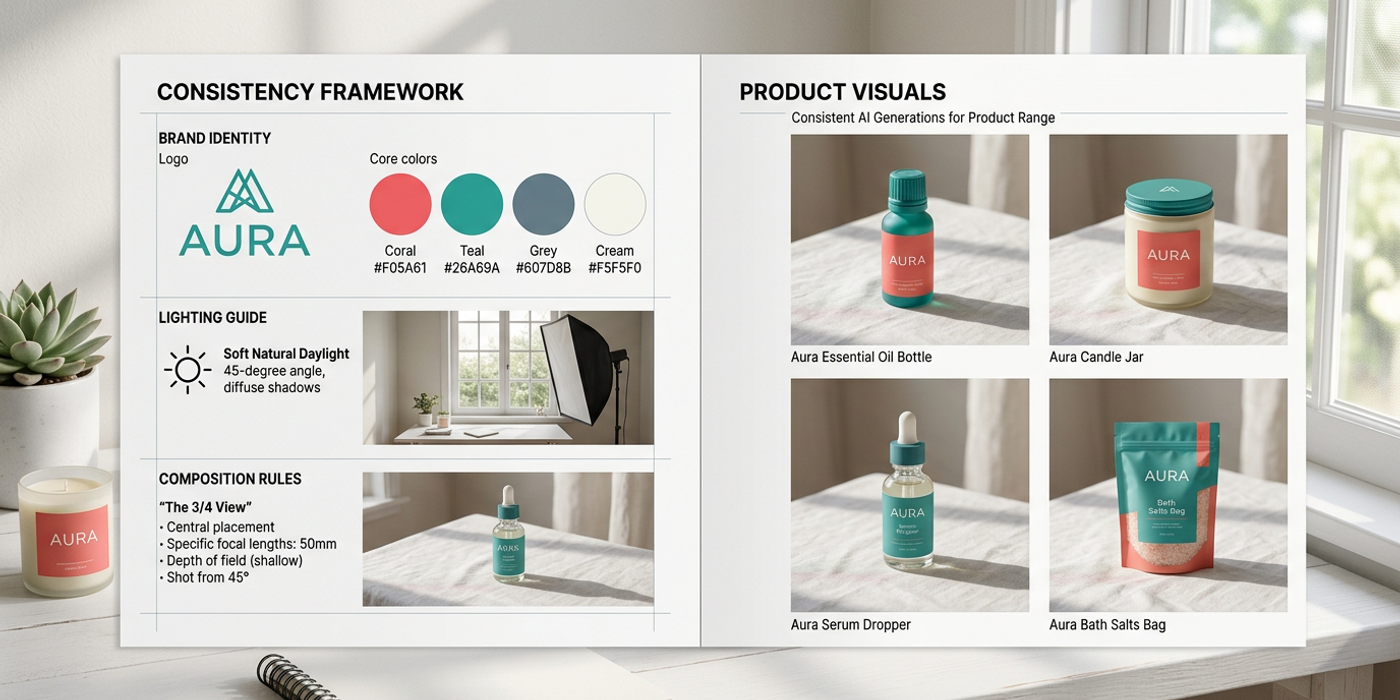
Brand consistency with AI is easier than ever in 2026. Here's how Hong Kong brands keep the same look across images, video, and voice with new tools.
Brand consistency used to be the hardest problem in AI content. Generate one image that nails your look — great. Generate ten that all feel like they belong to the same family — that required manual seedlocking, reference image libraries, and a lot of trial and error.
The latest AI image, video, and voice models have built-in brand consistency features that make the old workflows feel prehistoric. Here's what's different now and how Hong Kong brands are taking advantage of it.
Why Brand Consistency Matters More Than Ever
With AI content production scaling fast, inconsistency is the fastest way to dilute a brand. When your Instagram feed, website hero images, and video ads are all generated by AI, they need to feel like they came from the same creative team — not from five different tools with five different settings.
Hong Kong brands face an extra challenge: many produce content in English, Traditional Chinese, and Simplified Chinese simultaneously, across multiple platforms from WeChat to Instagram to Google Ads. Consistent visuals help bridge those channels and reinforce recognition. A 2025 study found that brands with consistent visual identity across platforms see up to 33% higher revenue — and in Hong Kong's competitive market, that edge matters.
What's Changed Since Mid-2026
The original version of this guide focused on manual techniques: building prompt frameworks, collecting reference image libraries, locking seeds. Those methods still work, but the tools have caught up.
Breakthroughs from mid-2026:
Seedream 4 — Style Reference Mode Seedream 4's style reference mode lets you upload one brand image and generate hundreds of variations matching its colour, lighting, and composition. Unlike earlier approaches that copied object shapes, Seedream 4 separates style from content — so you can change the product while keeping the brand look.
Nano Banana 2 — Brand Colour Locking Nano Banana 2 added hex-code colour constraints that bind the model to your brand palette. Define three to five brand colours and the model sticks to them across every generation. No more "deep navy" coming out as teal or purple — the hex codes are hard constraints, not suggestions.
GPT-Image-2 — Consistent Character Mode For brands with recurring characters (mascots, product models), GPT-Image-2's consistent character mode generates the same face across different scenes and outfits. This is a game-changer for Hong Kong brands running multi-scene ad campaigns with the same talent but no budget for a full photoshoot.
FLUX 3 Video and Seedance 2.5 — Cross-Modal Style Perhaps the biggest shift: both FLUX 3 Video and Seedance 2.5 now accept reference images for video generation. Upload a brand product shot and generate a 10-20 second video with the same colour grade and lighting — no manual colour grading needed. This makes it possible to maintain brand consistency not just across images, but across image AND video content from the same workflow.
Building a Brand Consistency Workflow in 2026
Here is the updated workflow that Hong Kong agencies and in-house teams are using today:
Step 1: Lock Your Brand DNA in One Place
Start by defining your brand's visual DNA as a structured spec. Include:
- Colours: Hex codes for your primary palette (3-5 colours max) - Lighting: One of three profiles — soft studio (products), natural daylight (lifestyle), or dramatic (luxury) - Composition: Centred, rule of thirds, or product-on-surface - Texture: Matte, glossy, organic, or clean
Save this as a spec in Cooly Studio's brand profile. Every team member then uses the same defaults.
Step 2: Generate with Native Brand Controls
For images, use Seedream 4 or Nano Banana 2 with your brand spec. Upload one approved brand image as a style reference. Set hex-code colour constraints. Lock a seed if you want pixel-level repeatability.
For video, use FLUX 3 Video or Seedance 2.5 with the same reference image. The video will inherit the brand's colour grade and lighting profile — no manual LUTs required.
Step 3: Scale with Cooly Studio Workflows
Cooly Studio's workflow builder chains these steps into a reusable brand template:
1. Import brand spec (colours, lighting, composition) 2. Upload reference image 3. Select model (Seedream 4 or Nano Banana 2 for images, FLUX 3 Video or Seedance 2.5 for video) 4. Set colour constraints 5. Run batch generation
Each run produces on-brand assets. Team members don't need to remember seeds or reference images — the workflow handles it.
Real Results from Hong Kong Brands
A Hong Kong luxury watch retailer needed 150 social media images and 30 short video ads for a new collection launch. Their old process: 2-day photoshoot, 3 days of post-production, HK$80,000 total cost.
Using the brand consistency workflow: - Time: 4 hours from brief to final assets - Cost: HK$2,500 in generation credits - Result: All 180 assets matched exactly to their brand style guide — same champagne-gold lighting, same dark navy background, same centred composition. The video ads retained the same colour grade as the images automatically.
A Hong Kong FMCG brand running WeChat and Instagram campaigns went further: they used the same brand spec for both image and video generation, then applied GPT-Image-2's consistent character mode to keep the same lifestyle model across all scenes. Campaign visuals went from "clearly AI-generated" to "coherent brand content" in one workflow update.
The Bottom Line
Brand consistency with AI content no longer requires manual workarounds. Late 2026 models have style reference, colour locking, and cross-modal consistency baked in. The brands winning in Hong Kong right now are the ones that moved beyond "get the prompt right" and started building systematic brand workflows.
If you're still manually seedlocking and noting down reference image filenames in a spreadsheet, it's time to upgrade your workflow. The tools can handle consistency — the only question is whether your process lets them.
Frequently Asked Questions
Q: Can I use the same brand settings across different AI models? A: Not directly — each model has different colour locking. Use Cooly Studio workflows to normalise settings across models.
Q: How many reference images do I need for good brand consistency? A: One is enough for most models. Two or three from different angles gives better results. Avoid using more than five — too many references confuse the model.
Q: Does brand consistency work with video too? A: Yes. FLUX 3 Video and Seedance 2.5 both accept reference images for video generation, preserving colour grade and lighting from your brand assets.
Q: How do I handle Cantonese and English content together? A: The brand consistency workflow is language-agnostic — it controls visuals, not text. Pair it with a separate bilingual text workflow for complete brand consistency across languages.
Q: Is seedlocking still relevant with the new models? A: Yes, but it's optional now rather than essential. Use seedlocking when you need pixel-level repeatability (e.g. AI-generated product shots for e-commerce catalogues).
Q: Do these features work with free-tier AI tools? A: Most brand consistency features require paid access to premium models. Cooly Studio's free tier supports basic reference image usage but not hex-code colour constraints.
Q: What if my brand uses very specific Pantone colours? A: Convert Pantone colours to hex codes first, then use Nano Banana 2's colour locking. Most converters are accurate enough.
Q: Can I apply brand consistency retroactively to existing AI assets? A: Not directly. You'd need to regenerate with a brand spec applied. Keep your brand spec saved so you can re-generate assets for any campaign at any time.