Move beyond single-tool workflows. Learn how Hong Kong agencies are orchestrating multi-model AI pipelines for faster, higher-quality creative production.
The creative AI landscape of late 2026 has moved decisively beyond the single-model workflow. Hong Kong's top agencies no longer ask "which AI model should I use?" — they ask "how do I connect the best models into a production pipeline?" This guide covers the shift from tool selection to pipeline orchestration, with practical patterns HK creatives are using right now.
Why Single-Model Workflows No Longer Cut It
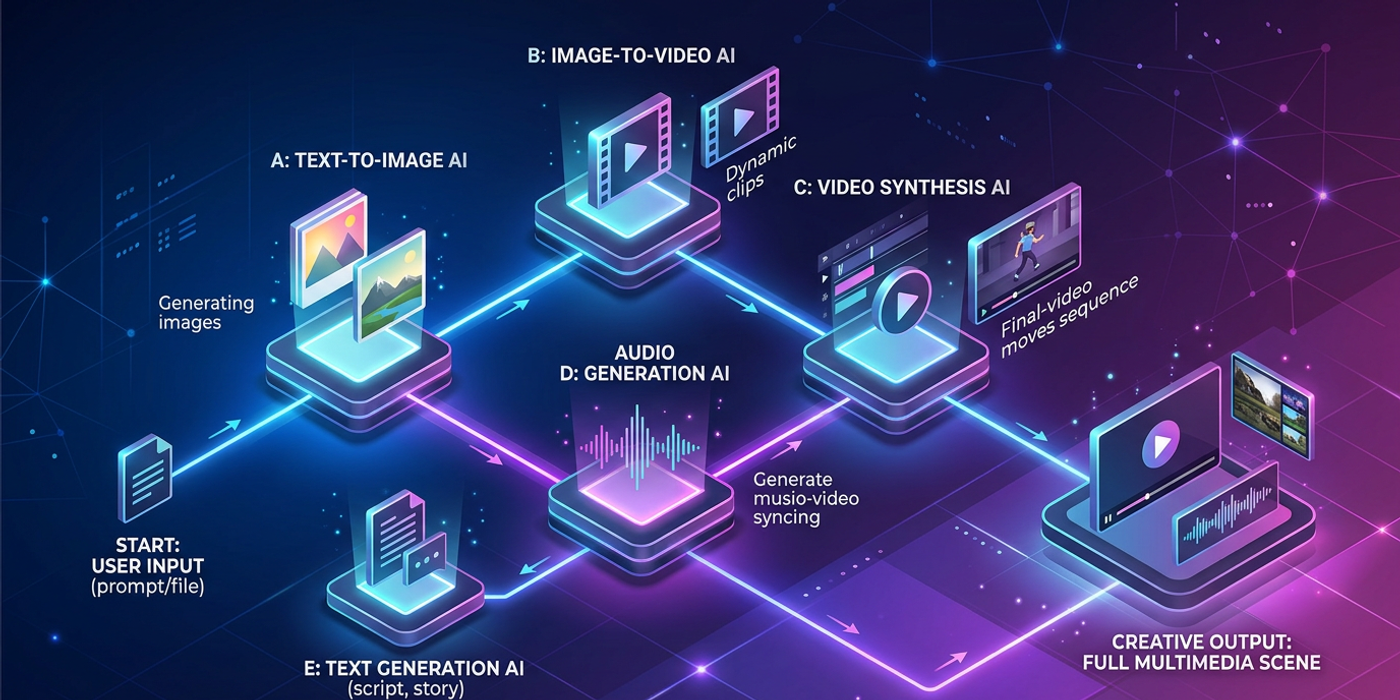
No single generative AI model excels at every task. The best results come from chaining models with complementary strengths:
- Text-to-image models (Nano Banana 2, FLUX Schnell, GPT-Image-2, Seedream 4) handle initial concept generation and brand-consistent keyframes - Image-to-video and text-to-video models (Veo 3.1, Kling 3.0, Seedance 2.5, Wan3.0) transform stills into motion with cinematic quality - Video enhancement tools handle upscaling, frame interpolation, and scene extension - Audio generation models (Cartesia Sonic 3.6, Gradium TTS, MiniMax-Music3, Adobe Firefly Audio) add voice, music, and sound effects
A Hong Kong agency producing a 30-second brand video might chain Nano Banana 2 for concept frames → Veo 3.1 for cinematic motion → Gradium TTS for Cantonese voiceover → MiniMax-Music3 for background score. Each model plays to its strength. No single model can match that quality alone.
The Three Pipeline Patterns HK Agencies Use Most
Pattern 1: Ideation → Refinement → Production. Start with rapid exploration on FLUX Schnell or GPT-Image-2 (fast and cheap). Select the best outputs, refine with Nano Banana 2 or Seedream 4 for higher fidelity, then push to final rendering. This pattern cuts iteration time by roughly 40% compared to refining every concept in a single premium model.
Pattern 2: Brand Asset Pipeline. For recurring client work, agencies build reusable model presets — style references, brand colour palettes, negative prompts, and composition guidelines — that plug into every new project. Each project runs through the same pipeline, producing consistent output without rebuilding the wheel. This is the pattern Lee Kum Kee and HKTB clients benefit from most.
Pattern 3: Multi-Modal Production Chain. The full pipeline: text prompt → image generation → video generation → audio generation → final edit. This handles high-volume video content at scale. A single prompt can produce a finished brand spot in under 15 minutes — from ideation to publishable output — using four different models in sequence.
Choosing the Right Orchestration Approach
Not every project needs a full multi-model chain. The key is matching pipeline complexity to output requirements:
- Social media graphics: A single T2I model with batch generation is sufficient. Adding video or audio only adds latency without proportional value. - Short-form video ads (15-30 seconds): The multi-modal chain pays off. Voiceover, music, and motion each benefit from specialised models. - Long-form content (60+ seconds): Split into segments, each with its own pipeline. Scene one might use Seedance 2.5 for video+audio in one pass; scene two uses a separate T2I→I2V chain for different visual style.
The cost equation matters too. Running four specialized models costs roughly the same as one premium all-in-one model, but produces notably better output per dollar because each model operates in its domain of excellence.
Tools for Pipeline Orchestration
The pipeline is only as good as the infrastructure connecting it. HK agencies use several approaches:
- API-based chaining: Direct API calls between model providers. Most flexible but requires development effort. - Node-based workflow builders: ComfyUI remains the gold standard for image and video pipelines. Its node graph lets creators drag and connect models, control nets, and post-processing steps without coding. - Custom middleware: Several HK agencies have built internal orchestration layers that route prompts through model selection logic — choosing Nano Banana 2 for photorealistic product shots, FLUX Schnell for fast ideation, and Seedance 2.5 when the brief requires video.
The trend is clear: the agencies investing in pipeline infrastructure, not just tool access, are the ones delivering faster and at higher quality.
Frequently Asked Questions
Q: What's the difference between a workflow and a pipeline? A: A workflow describes the steps you take. A pipeline is an automated or semi-automated system that executes those steps in sequence, often with different models handling different stages.
Q: Do I need coding skills to build an AI creative pipeline? A: Not necessarily. Node-based tools like ComfyUI let you build visual pipelines without code. For API-based chaining, some scripting knowledge helps but is not required if you use middleware tools.
Q: How much faster is a multi-model pipeline versus a single model? A: For video content, the difference is significant. A single model handling all stages may take 8-12 minutes per output. A chained pipeline can produce comparable results in 3-5 minutes by parallelising generation steps.
Q: Which models work best together in a pipeline? A: It depends on your use case. For brand photography, Nano Banana 2 paired with any upscaler works well. For cinematic video, FLUX Schnell for keyframes + Veo 3.1 for motion is a proven combination. Experiment with different pairs to find your optimal chain.
Q: Can I reuse my pipeline for different clients? A: The pipeline structure stays the same. You swap in client-specific presets — brand colours, reference images, tone guidelines — while keeping the model chain intact. This is how agencies achieve both consistency and scale.
Q: What's the biggest mistake agencies make when building pipelines? A: Over-engineering. Not every project needs four models. Start with a two-model chain, validate the output quality, then add stages only when the quality gap is measurable.
Q: How does pipeline design affect generation costs? A: Used strategically, pipelines reduce costs. Cheaper models handle early stages (ideation, rough cuts), while premium models are reserved for the final pass. This tiered approach cuts per-project costs by 20-30% versus using premium models for every step.
Q: Will AI pipeline tools replace creative jobs? A: They replace repetitive tasks, not creative roles. The demand for art direction, prompt strategy, and brand oversight is growing as pipelines handle the mechanical work. Creatives who understand pipeline design are more valuable, not less.