Stop overpaying for AI generation. Match the right model to each creative task to cut costs without sacrificing output quality — a guide for HK creators.
The AI generation landscape in 2026 is more diverse — and more confusing — than ever. With dozens of image, video, and audio models competing on price, quality, and speed, the difference between a profitable production pipeline and a money-losing one often comes down to one skill: choosing the right model for each job.
Whether you're a Hong Kong agency producing client work or a solo creator experimenting with AI tools, understanding how to match model capabilities to task requirements is the single biggest lever for controlling costs without sacrificing output quality.
The 2026 AI Generation Pricing Landscape
The era of flat-rate per-generation pricing is over. Today's model providers offer wildly different pricing structures, and the most expensive model for one task type might be the cheapest for another.
Per-image token pricing. Models like FLUX Schnell and Stable Diffusion 3.5 charge per generation with tiered pricing based on output resolution. A 1024x1024 image on FLUX Schnell costs about 1 credit, while a 2048x2048 output costs 4 credits. This tier jump means you should never generate at a higher resolution than your final use case requires.
Subscription bundles. Midjourney, Kling, and Pika offer monthly subscription tiers that bundle a fixed number of generations. These are cost-effective for heavy users but wasteful if you only need occasional outputs. For Hong Kong agencies producing daily content, a team subscription often works out cheaper per generation than pay-as-you-go.
API-based pay-per-token. OpenAI's GPT-Image-2 and Google's Gemini image models charge by token count. Both prompt complexity and output resolution affect the total — a verbose prompt can cost 2-3x more than a concise one, even for the same output size.
Open-weight self-hosting. Models like FLUX 3, LTX-2.5, and MiniMax-Music3 are available as open weights, meaning you pay only for compute. For agencies running their own GPU infrastructure, self-hosting reduces per-generation costs by 60-80% compared to API pricing. The trade-off is upfront setup time and ongoing GPU maintenance.
Matching Models to Tasks — A Practical Framework
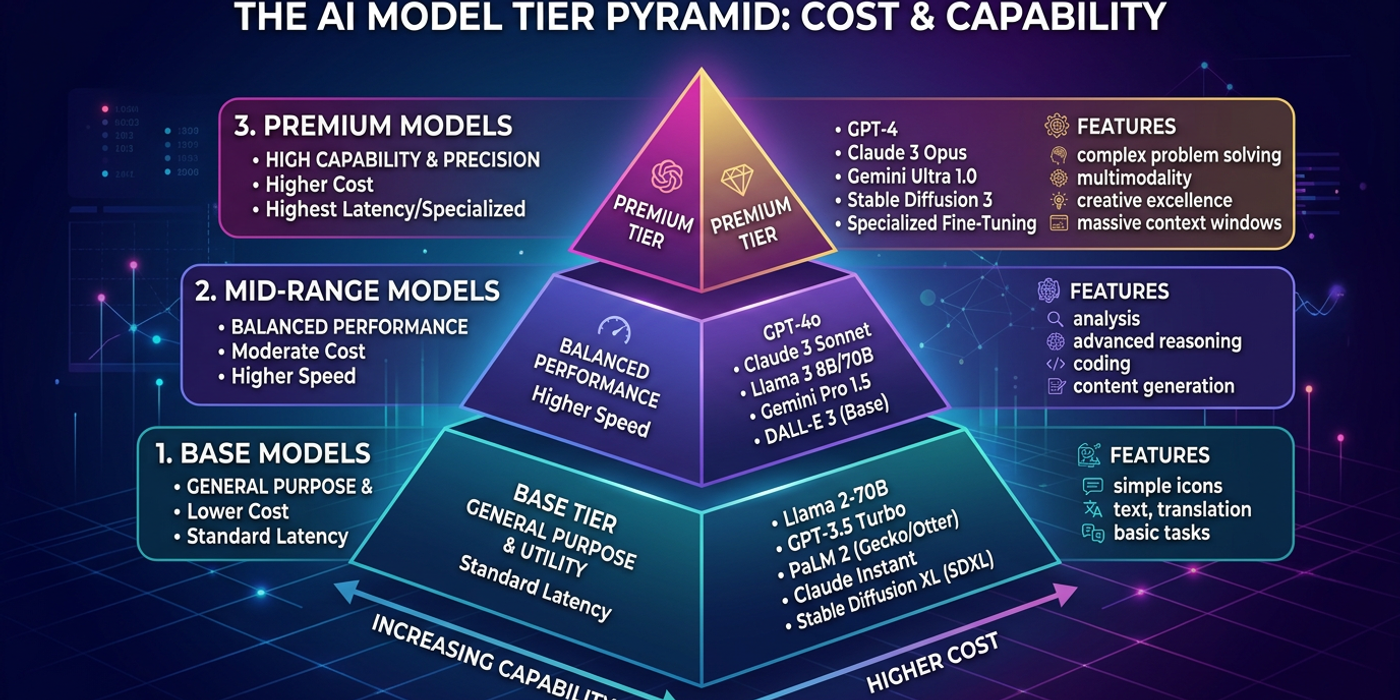
The simplest cost-saving strategy is pairing task complexity with model capability. Here is a tiered approach that cost-conscious Hong Kong agencies use in 2026:
Tier 1 — Quick ideation and rough drafts. Use FLUX Schnell or Stable Diffusion Turbo for initial brainstorming. These generate images in under two seconds and cost a fraction of premium models. Quality is good enough for mood boards and client pitch concepts. Reserve these for 60-70% of your generation volume.
Tier 2 — Client-facing mockups and social media content. Mid-range models like Nano Banana 2, Seedream 4, or DALL-E 3 deliver consistent quality suitable for social posts, ad creatives, and presentation materials. These sit in the middle of the pricing spectrum and represent the best value-for-quality ratio for most commercial work.
Tier 3 — Production-ready assets and hero images. Use premium models like GPT-Image-2, Ideogram 4.0, or FLUX 3 for hero images, product photography, and any asset in high-visibility placements. These models produce the highest fidelity but charge a premium. Limit these to your most important 10-15% of generations.
Hidden Cost Traps to Watch For
Several pricing pitfalls can silently inflate your AI generation costs:
Resolution overkill. Generating at 4K resolution when you only need 1200x628 pixels for social media is the most common waste. Check your final output requirements before setting generation parameters. Many agencies find that 70% of their social media generations work fine at 1024x1024 or lower without noticeable quality loss.
Redundant generations. Running the same prompt 20 times hoping for a better result instead of refining the prompt burns credits fast. Set a batch limit — generate 3-5 variations, then iterate on the best one. Most premium models produce their best output within 3-4 generations if the prompt is well-structured.
Unused subscription credits. Fixed monthly subscriptions expire unused credits. If your team uses only 60% of a subscription tier, downgrading to a lower tier and supplementing with pay-as-you-go can save 30-40% monthly. Track usage patterns over two billing cycles to identify the right tier.
API call overhead. Some API-based models charge minimum tokens per request, making very short generations disproportionately expensive. A short prompt using only 50 tokens may still be billed at the minimum 200-token rate. Batch similar requests or consolidate prompts to avoid this overhead.
Building a Cost-Optimised Workflow
The most cost-efficient Hong Kong agencies in 2026 use a tiered pipeline approach:
Prompt engineering first. Before generating anything, spend time crafting precise prompts. A well-written prompt on a Tier 1 model often outperforms a vague prompt on a Tier 3 model. This single habit can reduce your generation costs by 30-50%.
Generate at final-use resolution only. Create a resolution reference sheet for your most common output formats — Instagram story, LinkedIn banner, YouTube thumbnail — and stick to them. Resist the urge to upscale unless the asset is for print or large-format display.
Use open-weight models for batch work. If your agency produces product photography for e-commerce clients, self-hosting an open-weight model like FLUX 3 or SD 3.5 on a GPU instance is significantly cheaper than API pricing at volume.
Monitor and audit generation costs weekly. Track how many generations each project consumes and which models are being used. Teams that monitor costs weekly identify waste patterns three times faster than those who check monthly.
Frequently Asked Questions
Q: Is it cheaper to run open-weight models on my own hardware? A: Yes — for high-volume production (500+ generations per week), self-hosting open-weight models cuts costs by 60-80% compared to API pricing. For low-volume or occasional use, API models are more practical since you avoid GPU infrastructure costs.
Q: How many variations should I generate per prompt to find the best result? A: 3-5 variations is the sweet spot for most models. Generation quality stabilises quickly — running more than 8-10 rarely produces a significantly better result and wastes credits.
Q: Do subscription plans offer better value than pay-as-you-go? A: For teams generating 50+ images or 20+ videos per week, subscriptions are almost always cheaper. For casual or occasional use, pay-as-you-go wins.
Q: What is the biggest mistake agencies make with AI generation budgets? A: Using a single premium model for all work instead of tiering models by task. Most agencies can shift 60-70% of their generations to lower-tier models without noticeable quality differences in final outputs.
Q: Does prompt complexity affect generation cost? A: Yes — on token-based pricing, a verbose prompt can cost 2-3x more than a concise one. Keep prompts focused on essential details and let the model handle stylistic interpretation.
Q: How can I tell if I am overpaying for AI generation? A: Compare your per-asset cost across model tiers. If 80% of your budget goes to premium models but only 15% of outputs are used for high-visibility placements, you are overpaying. Shift routine work to mid-range models.
Q: Are free AI image models worth using for commercial work? A: Free tiers are excellent for experimentation and learning but generally lack the consistency, resolution, and commercial licensing needed for client deliverables. Use them for internal testing, not production.
Q: How often should I reassess my model selection strategy? A: Every 4-6 weeks. The AI model landscape changes rapidly — new models, pricing tiers, and open-weight releases can shift the cost calculus significantly.